http://en.wikipedia.org/wiki/Man-in-the-browser
Man-in-the-browser (MITB, MitB), a form of Internet threat related to man-in-the-middle (MITM), is a proxy Trojan that infects a web browser and has the ability to modify web pages, modify transaction content or insert additional transactions, all in a completely covert fashion invisible to both the user and host application.
A MitB attack will be successful irrespective of whether security mechanisms such as SSL/PKI and/or Two or Three Factor Authentication solutions are in place.
A MitB attack may be countered by utilising out-of-band transaction verification, although SMS verification can be defeated with mobile malware on the mobile phone.
Trojans may be detected and removed by antivirus software with a 23% success rate against Zeus in 2009, and still low rates in 2011.
The 2011 report concluded that additional measures on top of antivirus were needed.
The majority of financial service professionals in a survey considered MitB to be the greatest threat to online banking.
Description
The man-in-the-browser threat was demonstrated by Augusto Paes de Barros in his 2005 presentation about backdoor trends "O futuro dos backdoors - o pior dos mundos" ("The future of backdoors - worst of all worlds"). It was named as man-in-the-browser by Philipp Gühring in a white paper "Concepts against Man-in-the-Browser Attacks", 27 January 2007.
A MitB Trojan works by utilising common facilities provided to enhance browser capabilities such as Browser Helper Objects (a feature limited to Internet Explorer), Browser extensions and User scripts (for example in JavaScript) etc. Antivirus software can detect some of these methods.
In an example exchange between user and host, e.g. an Internet banking transaction such as a funds transfer, the customer will always be shown, via confirmation screens, the exact payment information as keyed into the browser. The bank, however, will receive a transaction with materially altered instructions, i.e. a different destination account number and possibly amount. The use of strong authentication tools simply creates an increased level of misplaced confidence on the part of both customer and bank that the transaction is secure. Authentication, by definition, is concerned with the validation of identity credentials. This should not be confused with transaction verification.
Monday, 6 February 2012
Wednesday, 14 September 2011
How can I delete my MySpace account?
http://www.askdavetaylor.com/how_can_i_delete_my_myspace_account.html
if you are prepared to cancel and quit your account, here's how you do it.
First, log in and click on "Account Settings" next to your page, then click on "Change Account Settings". You'll see:
MySpace: Change Account Settings
You want to click on the link "Cancel Account". When clicking, you will receive an email, asking for your confirmation to cancel your account:
"WARNING: Cancelling your MySpace account will PERMANENTLY REMOVE all of your profile information from MySpace, including your photographs, comments, journals, and your personal network of friends. This information cannot be restored. You may re-register your current email address after cancelling, but you will need to rebuild your personal network from scratch."
and you'll see this:
MySpace: Cancel Account
If this is truly what you want to do, click on "Cancel My Account" and you'll vanish from the world of MySpace, from everyone's friends list, and similar. You can then start over, or you can leave it alone forever.
Good luck to you, either way.
if you are prepared to cancel and quit your account, here's how you do it.
First, log in and click on "Account Settings" next to your page, then click on "Change Account Settings". You'll see:
MySpace: Change Account Settings
You want to click on the link "Cancel Account". When clicking, you will receive an email, asking for your confirmation to cancel your account:
"WARNING: Cancelling your MySpace account will PERMANENTLY REMOVE all of your profile information from MySpace, including your photographs, comments, journals, and your personal network of friends. This information cannot be restored. You may re-register your current email address after cancelling, but you will need to rebuild your personal network from scratch."
and you'll see this:
MySpace: Cancel Account
If this is truly what you want to do, click on "Cancel My Account" and you'll vanish from the world of MySpace, from everyone's friends list, and similar. You can then start over, or you can leave it alone forever.
Good luck to you, either way.

PeerBlock is a free software firewall
http://www.peerblock.com/
PeerBlock is a free software firewall application. PeerBlock is the successor to PeerGuardian (which is no longer actively maintained[1]). It blocks incoming and outgoing connections to Internet IP addresses that are included on blocklists accessible over the Internet which may be selected by the user, but also any addresses manually specified by the user.[1] PeerBlock mainly works in tandem with the blocklist provider iblocklist.com.

PeerBlock is a free software firewall application. PeerBlock is the successor to PeerGuardian (which is no longer actively maintained[1]). It blocks incoming and outgoing connections to Internet IP addresses that are included on blocklists accessible over the Internet which may be selected by the user, but also any addresses manually specified by the user.[1] PeerBlock mainly works in tandem with the blocklist provider iblocklist.com.
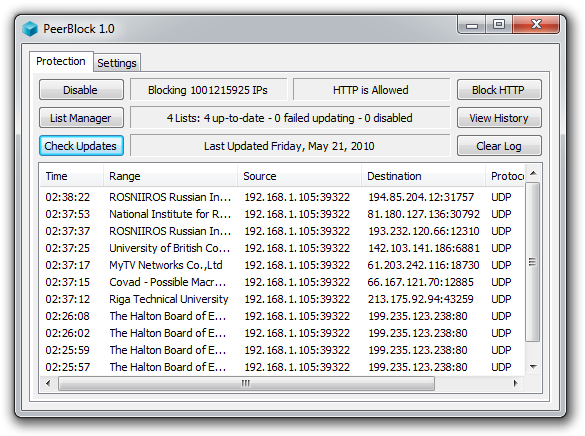
PeerBlock lets you control who your computer "talks to" on the Internet. By selecting appropriate lists of "known bad" computers, you can block communication with advertising or spyware oriented servers, computers monitoring your p2p activities, computers which have been "hacked", even entire countries! They can't get in to your computer, and your computer won't try to send them anything either.
PeerBlock History
(TODO: talk about how we forked from PeerGuardian, user donations, etc)
Years ago there was a program called "Peer Guardian", which was a pretty good IP Blocker. The developers of Peer Guardian appear to have abandoned it back in 2007, after releasing a "Beta" that included initial support for Windows Vista. This version was the only version that worked on Vista (and now Windows 7), and required all sorts of hacks and workarounds to get it to run more-or-less successfully. There were also a lot of bugs in the source code for Peer Guardian, such that even after applying all the workarounds it still would fail with relative ease.
PeerBlock History
(TODO: talk about how we forked from PeerGuardian, user donations, etc)
Years ago there was a program called "Peer Guardian", which was a pretty good IP Blocker. The developers of Peer Guardian appear to have abandoned it back in 2007, after releasing a "Beta" that included initial support for Windows Vista. This version was the only version that worked on Vista (and now Windows 7), and required all sorts of hacks and workarounds to get it to run more-or-less successfully. There were also a lot of bugs in the source code for Peer Guardian, such that even after applying all the workarounds it still would fail with relative ease.
Thursday, 1 September 2011
Embed Windows Live Messenger in web page
http://shareourideas.com/2010/09/27/embed-windows-live-messenger-in-web-page/
msnim: command
How to use Windows Live Messenger (MSN) functions in web page?Command list :-
Use this file command we can add, chat, voice and video chat too..
<a href=”msnim:chat?contact=[USERNAME]“>Contact us</a> — To chat
<a href=”msnim:add?contact=[USERNAME]“>Add me</a> — Add to contact list
<a href=”msnim:voice?contact=[USERNAME]“>Voice chat</a> — Strat voice chat
<a href=”msnim:video?contact=[USERNAME]“>Video conversation</a> – Start Video conversation
Note:-
[UserName] Replace with you email ID.
This protocol work like mailto: , if we specified href=”mailto:mail@mail.com” then. If the end use click on that like, it will open default mail window (OUTLOOK).
Like this using msgim: commands also automatically open the windows live messenger. *But we must install live messenger.
Subscribe to:
Posts (Atom)